GamePigeon Checkers is one of the most popular mobile multiplayer games in the world. Played inside Apple's iMessage between friends, classmates, and family members, matches can quickly turn into high-stakes rivalries. Yet most casual players make predictable mistakes: abandoning their back row too early, neglecting center control, or falling victim to forced-jump traps.
In this master guide, we break down exact tactical systems to defeat anyone in GamePigeon Checkers — and show you how to use our free in-browser Checkers Solver & Best Move Calculator to scan screenshots and calculate the mathematically perfect move every turn.
To consistently win GamePigeon Checkers on iMessage:
- Never move your 4 back-row pieces (squares 1–4 or 29–32) until late game to block opponent Kings from crowning.
- Weaponize mandatory captures: Jumps are strictly compulsory in GamePigeon. Deliberately sacrifice 1 pawn to force a 2-for-1 or 3-for-1 counter-jump!
- Dominate the 4 center squares (14, 15, 18, 19) to control diagonals and avoid getting trapped on the outer rim.
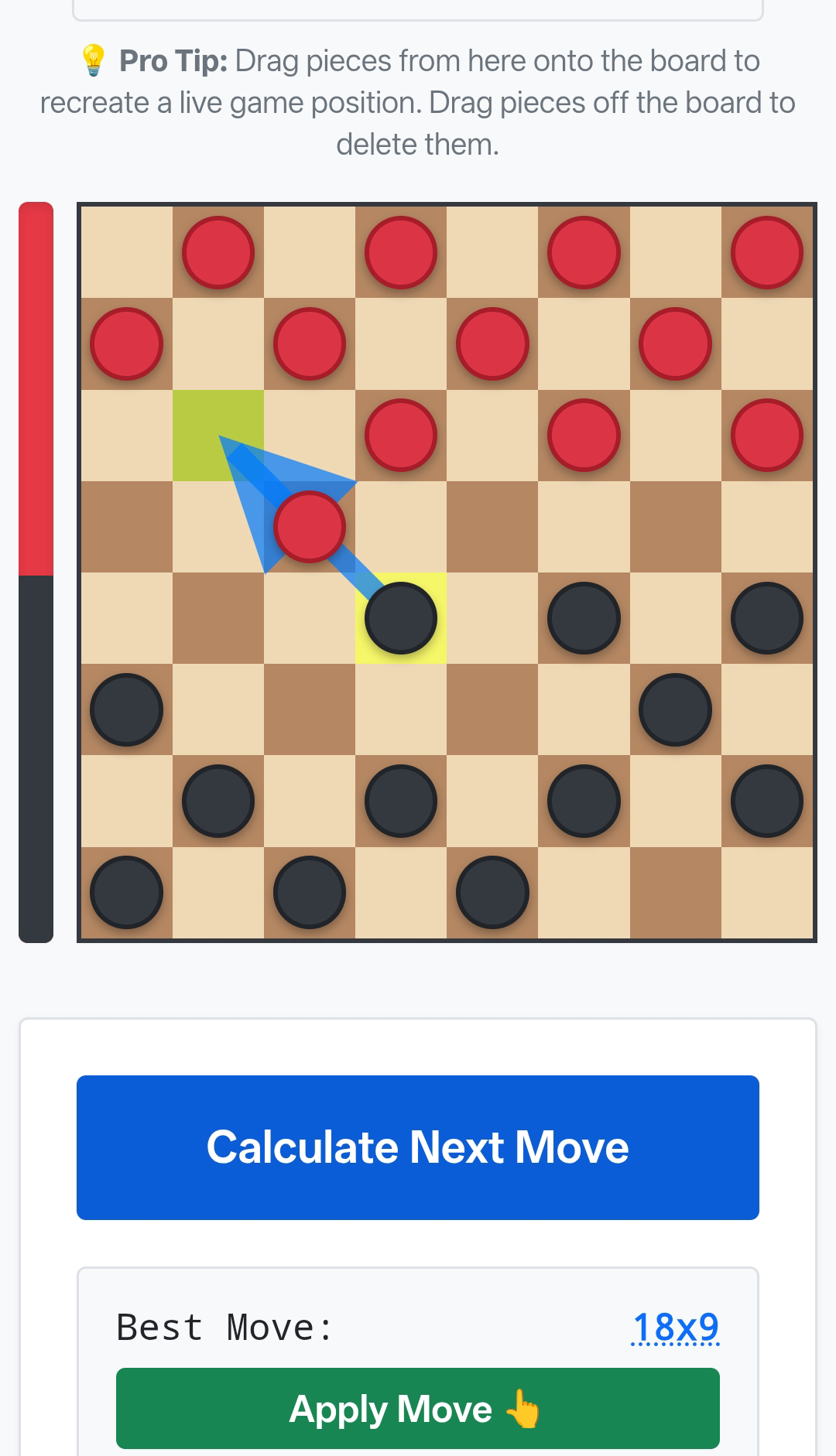
- Solve tricky positions from a screenshot: Upload an iMessage screenshot to Next Checkers Move to compute the 100% optimal move with real-time arrow overlays.
How to Play Checkers on iMessage (GamePigeon Setup)
To start a checkers game on iPhone or iPad, open any conversation in the Apple Messages (iMessage) app, tap the GamePigeon icon in the app drawer above the keyboard, and select Checkers. Send your first move as an iMessage bubble to invite your friend. Games are played turn-by-turn asynchronously: each player receives a notification when it is their turn and can make their move directly in the chat thread.
How GamePigeon Checkers Rules Work
GamePigeon Checkers follows official American Checkers (Straight Checkers / English Draughts) rules on an 8×8 dark-and-light grid with 12 pieces per side:
- Single Forward Moves: Uncrowned pawns (men) can only advance diagonally forward by one square onto an unoccupied dark square.
- Mandatory Captures (Jumps are Forced!): If a capture jump is available, the game rules require you to take it. You cannot decline a capture. If multiple capture routes are available, you may choose which one to execute.
- Multi-Jumps: If a jumping piece lands on a square with another adjacent jump immediately available, it must continue jumping in the same turn until no further captures are possible.
- King Promotion: When a pawn reaches the opponent's back rank (row 1 or row 8), it is crowned a King. Kings gain the superpower to move and jump both forward and backward.
Why Does GamePigeon Checkers Force You to Jump? (The "Glitch" Explained)
One of the most frequently searched questions about iMessage checkers is: "Why won't GamePigeon let me move my other pieces?" or "Is GamePigeon checkers glitched?"
It is not a bug or a glitch. In official American Checkers (the ruleset used by GamePigeon), capturing jumps are strictly mandatory. If any piece on your board has a legal jump to capture an opponent's checker, GamePigeon highlights only that piece and locks all non-jumping moves until the capture is completed.
If you have multiple pieces that can jump, or one piece with several capture directions, you can choose which line to execute—but you cannot decline a jump to make a quiet positional move.
Top 4 Winning Strategies for GamePigeon Checkers
1. Protect the "Crown Head" (Your Back Row)
The single biggest mistake amateur GamePigeon players make is moving their back rank pieces (squares 1, 2, 3, 4 for Red or 29, 30, 31, 32 for Black) early in the game.
As long as your four back-row pieces remain in place, your opponent cannot crown a single King on those squares. Keep your back row intact as a defensive wall until late in the middle game. The first player to crown a King almost always wins GamePigeon matches.
2. The Forced Sacrifice Gambit (Exploiting Mandatory Jumps)
Because jumps are mandatory in GamePigeon, you can manipulate your opponent's pieces like puppets. Look for opportunities to push one of your pawns directly into the path of an opponent's checker:
- The opponent is forced to jump and capture your single piece.
- Their landing square lands right into the jaws of your awaiting King or double-jump line.
- You instantly execute a 2-for-1 or 3-for-1 jump back, obliterating their defense!
3. Dominate the Center Four Squares
Pieces situated on the outer edge (the rim) can only jump in one direction. A piece in the center of the board (squares 14, 15, 18, 19) controls two forward diagonals, can jump in both directions, and prevents your opponent from advancing freely. As the old checkers proverb says: "A checker on the rim is dim, but a checker in the center is a winner."
4. The Double-Corner Squeeze
In the endgame when both players have Kings, games often come down to hunting down the opponent's remaining pieces. Checkers boards have two distinct corners:
- Single Corner: Squares 4 and 29. Dangerous to hide in because you can be trapped easily.
- Double Corner: Squares 1 & 5 and 28 & 32. Kings in the double corner have two exit lanes and cannot be trapped by a single enemy piece.
Drive your opponent's Kings into the single corner while anchoring your own pieces near the double corner to force a decisive zugzwang (a position where every move they have loses).
How to Solve Any GamePigeon Position Using AI Vision
Got stuck in a tricky match or playing a competitive wager against a friend? Here is the exact step-by-step method to solve any iMessage game:
- Take a Screenshot: Press Side Button + Volume Up on your iPhone while viewing the active GamePigeon checkers board.
- Open Next Checkers Move: Navigate to our Checkers Solver & Best Move Calculator in Safari.
- Upload Screenshot: Click 📷 Scan Board from Screenshot, select your screenshot from Photos, and watch our AI vision detect piece positions automatically.
- Calculate Optimal Move: Click Apply to Board & Solve. Our Minimax bitboard engine runs up to 14 ply deep and displays the exact mathematical best move with a blue directional arrow on the board!
Verified AI Accuracy & Game Theory Principles
All moves and tactical sequences in this guide have been verified using the Next Checkers Move Bitboard Minimax Engine. Key architecture specifications:
- Depth 14 Ply Game-Tree Search: Evaluates forced jump branches up to 14 turns ahead in under 50 milliseconds.
- Quiescence Tactical Search: Eliminates the "horizon effect", ensuring all multi-jump capture sequences are calculated to full resolution.
- Official WCDF Rules: Complies 100% with World Checkers / Draughts Federation official American rules.
- 100% Client-Side Privacy: Computer vision and move evaluations run entirely in your web browser—zero images or game states are stored on external servers.
Ready to Dominate Your Next iMessage Game?
Try our 100% free, zero-ad browser solver with instant screenshot scanning and millisecond Minimax calculations.
Try Checkers Solver & Best Move Calculator →