247 Checkers (by 247 Games) is one of the most widely played browser and mobile checkers games in history. Millions of casual players load up 247checkers.com every day to relax, sharpen their tactical thinking, or tackle the daily challenge. However, moving up from the forgiving Easy (1-Star) and Medium (2-Star) difficulties to 4-Star Expert difficulty often feels like running into an immovable brick wall.
On Expert difficulty, the 247 Checkers computer rarely gives away free pieces, aggressively sets up double-jump forks, and exploits any unprotected gaps in your defenses. In this comprehensive guide, we examine how the 247 Checkers engine operates, explore three tournament-tested strategies to defeat the Expert AI consistently, and demonstrate how you can use our free in-browser Checkers Solver & Best Move Calculator to scan screenshots and solve any complex board position instantly.
To defeat 247 Checkers on 4-Star Expert difficulty:
- Lock your back-row fortress: Keep squares 1, 2, 3, 4 (or 29–32) untouched until late game so the 247 AI can never promote Kings early.
- Exploit the mandatory jump rule: Sacrifice a single piece to lure the computer into an inescapable 2-for-1 or 3-for-1 counter-jump.
- Advance through the center diagonals: Focus attacks on squares 14, 15, 18, and 19 while avoiding isolated moves on the edge rim.
- Scan & solve when stuck: Take a quick screenshot and upload it to Next Checkers Move to see the engine's highest-scoring move in milliseconds.
How 247 Checkers Rules & Difficulty Levels Work
247 Checkers is built on official American Checkers (Straight Checkers / English Draughts) rules. It uses an 8×8 board with 64 squares, where gameplay occurs exclusively on the 32 dark squares with 12 checkers per player:
- Single Forward Moves: Men (unpromoted pawns) can only advance diagonally forward onto adjacent empty dark squares. Men cannot move backward or capture backward.
- Captures are Strictly Mandatory: If an opponent piece is diagonally adjacent with an empty landing square directly behind it, jumping over it to capture is compulsory. 247 Checkers will not allow you to make a standard move if a jump is on the board.
- Continuous Multi-Jumps: If a jumping piece arrives on a square where another jump is immediately legal, it must continue jumping in the same turn until all chained captures are completed.
- King Crowning: Once a pawn reaches the farthest row on the opponent's side, it is crowned a King. Kings gain the ability to move and capture both forward and backward.
The 4 Difficulty Levels in 247 Checkers:
- 1-Star (Easy): The computer selects moves with little tactical foresight, frequently stranding isolated pieces and walking into obvious 2-for-1 traps.
- 2-Star (Medium): The AI avoids immediate 1-move blunders but lacks deep positional strategy, often advancing its back rank prematurely.
- 3-Star (Hard): Calculates 3–4 ply ahead, actively contests central diagonals, and preserves pieces methodically.
- 4-Star (Expert): Searches multiple plies into the future with tree evaluation. It rarely leaves unprotected men, sets up forced-jump sacrifices to crack your formation, and plays sharp endgame technique.
Top 3 Proven Tactics to Defeat 247 Checkers Expert AI
1. The Back-Rank Fortress (The King Blocker)
The single most common mistake human players make against 247 Checkers is advancing their four back-row checkers (squares 1, 2, 3, 4 for Red or 29, 30, 31, 32 for Black) during the opening or middle game.
In American Checkers, an opponent pawn can only be crowned King by reaching one of your back-row squares. As long as your own pieces occupy those squares, the enemy pawn cannot legally land there to crown!
By keeping your back row completely stationary as an impenetrable defensive wall, you deny the 247 Checkers Expert AI any early King promotions. While the computer is forced to push its pawns against an unbreakable barricade, you can maneuver your advanced pieces to pick off its attackers one by one.
2. Baiting Mandatory Jumps (The 1-for-2 Shot)
Because capturing is mandatory in 247 Checkers, the computer's turn is strictly constrained whenever a jump is available. You can exploit this mechanical rule to orchestrate devastating combination shots:
- The Sacrifice Bait: Deliberately slide one of your checkers into a vulnerable square where the computer is forced to jump it.
- The Ambush Landing: Position your sacrifice so that the computer's jumping piece lands precisely on a square where you have a double or triple jump lined up in response.
- The Net Result: You sacrifice 1 pawn, but immediately capture 2 or 3 of the computer's pawns on your following turn. Against 247 Checkers Expert mode, executing a single 2-for-1 shot is usually enough to secure an insurmountable material advantage.
3. The Double-Corner Endgame Trap
Once you transition into the endgame with crowned Kings, the 247 Checkers AI will attempt to survive by maneuvering its remaining pieces into safety. Understanding board corners is essential:
- The Single Corner (Squares 4 & 29): A dead-end trap. A King caught in the single corner can easily be pinned against the wall by a single opposing King.
- The Double Corner (Squares 1 & 5 or 28 & 32): Safe ground. A King situated in the double corner has two adjacent exit paths and cannot be trapped by a single adversary.
When hunting down the 247 Checkers computer's final Kings, herd them toward the single corner while anchoring your own Kings across the primary diagonals. This forces a zugzwang where every legal move the computer has leads to immediate capture.
How to Solve Any 247 Checkers Position with AI Vision
If you encounter a complex tactical puzzle, a deadlocked middle game, or a daily challenge match in 247 Checkers, you do not have to guess the correct move. Here is how you can use Next Checkers Move to find the grandmaster solution in seconds:
-
Capture a Screenshot of 247 Checkers:
- On Windows PC: Press Win + Shift + S and drag a rectangle over the 247 Checkers board.
- On Mac: Press Cmd + Shift + 4 and select the board.
- On iPhone / Android: Take a standard screenshot while playing the game in your mobile browser.
- Open Next Checkers Move: Navigate to Next Checkers Move (https://nextcheckersmove.com) in another tab or on your phone.
- Scan Board from Screenshot: Click the green 📷 Scan Board from Screenshot button. Paste your screenshot directly (Ctrl + V) or upload the saved image.
- Automatic Optical Recognition: Our computer vision AI detects the dark squares, identifies piece colors (Red vs. Black), flags crowned Kings, and confirms the board orientation.
- Calculate Next Move: Click Apply to Board & Solve. Our Minimax bitboard engine calculates up to 14 ply deep and renders a clear visual blue arrow showing the exact winning move!
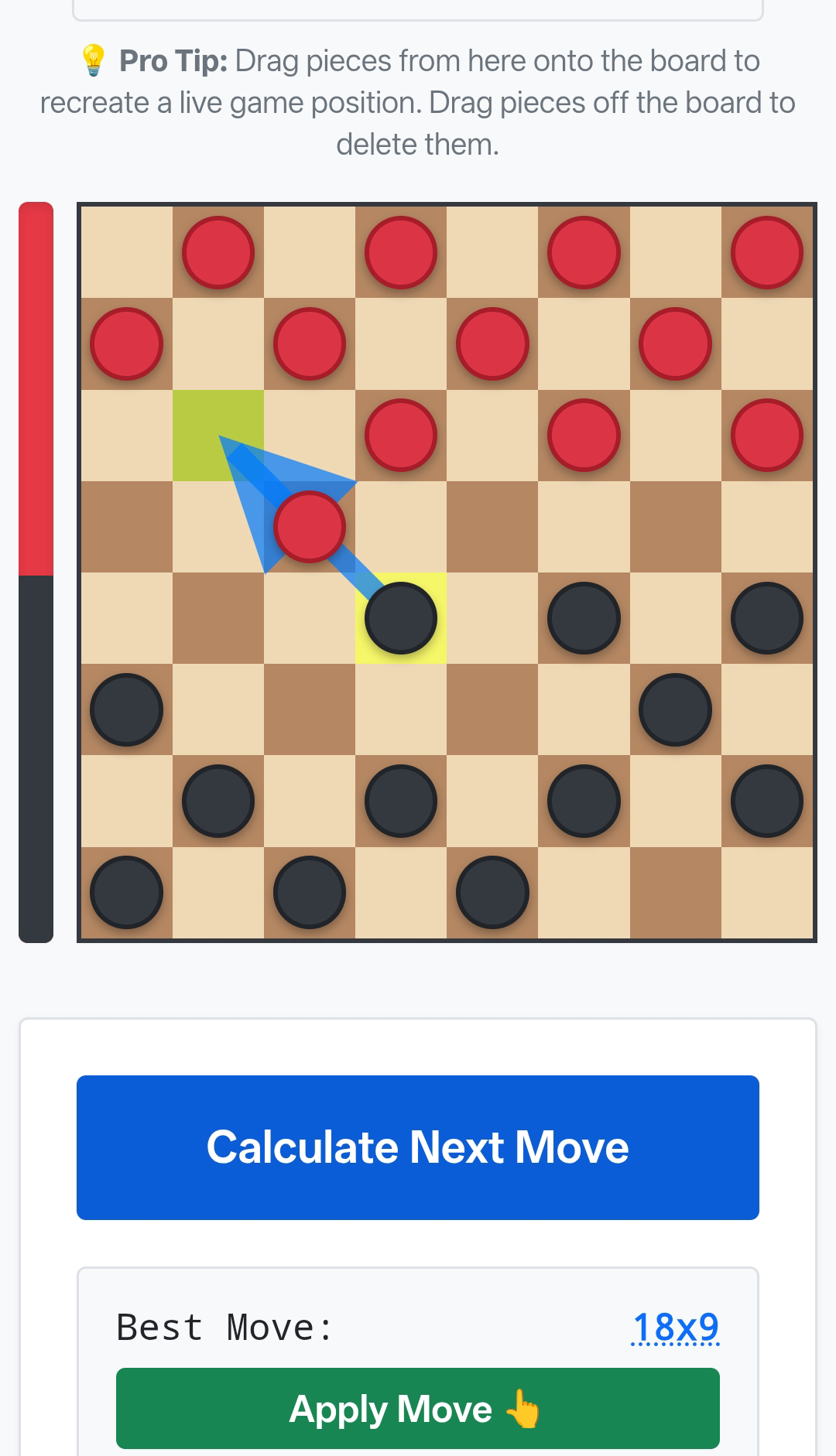
Why Next Checkers Move Crushes 247 Checkers AI
The in-browser engine running on 247 Checkers operates at shallow search depths to ensure smooth performance across low-end mobile devices. In contrast, Next Checkers Move uses an advanced web-worker Minimax bitboard architecture:
- Depths 4 to 14 Ply: Searches millions of game states ahead, foreseeing tactical traps 6 to 10 moves before the 247 Checkers AI detects them.
- Quiescence Search: Evaluates all capturing cascades to completion, eliminating tactical blind spots and blunder states.
- Positional Evaluation Bar: Delivers precise numerical balance scores (+1.00 equals a 1-pawn material advantage) with win/draw/loss indicators.
- 100% Client-Side Privacy: Fast, free, and runs entirely in your browser with zero server latency or data collection.
Frequently Asked Questions (FAQ)
Is there a cheat or bot for 247 Checkers?
While 247 Checkers has no built-in cheat codes, you can use Next Checkers Move (https://nextcheckersmove.com) as a real-time game helper. Simply screenshot your board, upload it to the AI scanner, and follow the optimal moves suggested by the engine.
Does 247 Checkers follow official checkers tournament rules?
Yes. 247 Checkers follows standard American Checkers (English Draughts) rules, including mandatory captures, non-flying single-step Kings, and 12 pieces per player on an 8×8 board.
Can I play 247 Checkers on mobile without installing an app?
Yes. 247 Checkers is an HTML5 browser game that runs directly in Safari, Chrome, and Firefox on iOS and Android without any downloads. Similarly, Next Checkers Move runs natively in mobile browsers with full touch and camera upload support.
Ready to Defeat 247 Checkers on Expert?
Launch our free in-browser checkers move calculator, scan your 247 Checkers board, and discover the winning move in milliseconds.
Try Checkers Solver & Best Move Calculator →